Month: October 2025

  • MAKING CHARACTER —13/10/25


    This rotation, as mentioned here, was something I looked forward to before the rotations began, even moreso after I finished breaking character because I was excited to finally animate Mouse!

    Firstly, we were given the brief for the rotation, which was to create a 5-8 second animation using Photoshop, applying the 12 principles of animation to them. We were told to use the motion plans we created in Breaking Character, and add colour (optional) and sound effects (mandatory) to the animation later on.

    We were told to write our goals for this rotation, and this is what I wrote:

    Learn how to animate mouse, show how his ears pop out and improve cel shading.

    The reason why I wrote the last point is because before university I would draw realism/semi-realism, therefore I didn’t have the experience when making more cartoon drawings with simplified shading. When I would try, it wouldn’t look right, and so I focussed more on developing my skills with realism/semi-realism. By this time, I did begin drawing cartoon characters (also K-Pop related…), but I was mostly doing sketches instead of colouring/shading because I wasn’t comfortable with that yet.

    We then were given a briefing on how to use Photoshop, before using the last hour to brainstorm animation ideas.

    I really didn’t know what to animate at first, and navigating through Photoshop was still difficult despite the tutorial, and so I didn’t end up working on anything. But I still had an initial idea despite this setback, which was to animate Mouse transforming from a computer mouse (his form around humans) to a “real mouse” (his true form), inspired by Toy Story.

    Overall, it was probably because I had such high expectations, but the first lesson felt like the energy from Jess’ rotation got seeped out of it. It wasn’t Mariana’s fault at all, and she taught really well, but I didn’t have as much enthusiasm when learning about the brief and thinking about what to animate. Plus, I really didn’t know why we were using Photoshop as a software, especially because it’s notorious for not being very user friendly or good with animation in general. I found it incredibly tedious to work with before I tried Animate instead out of sheer spite (but had to go back to Photoshop after Mariana saw me using Animate instead. Nevertheless I still enjoyed the lesson, and was still looking forward to animating Mouse and watching him come to life.
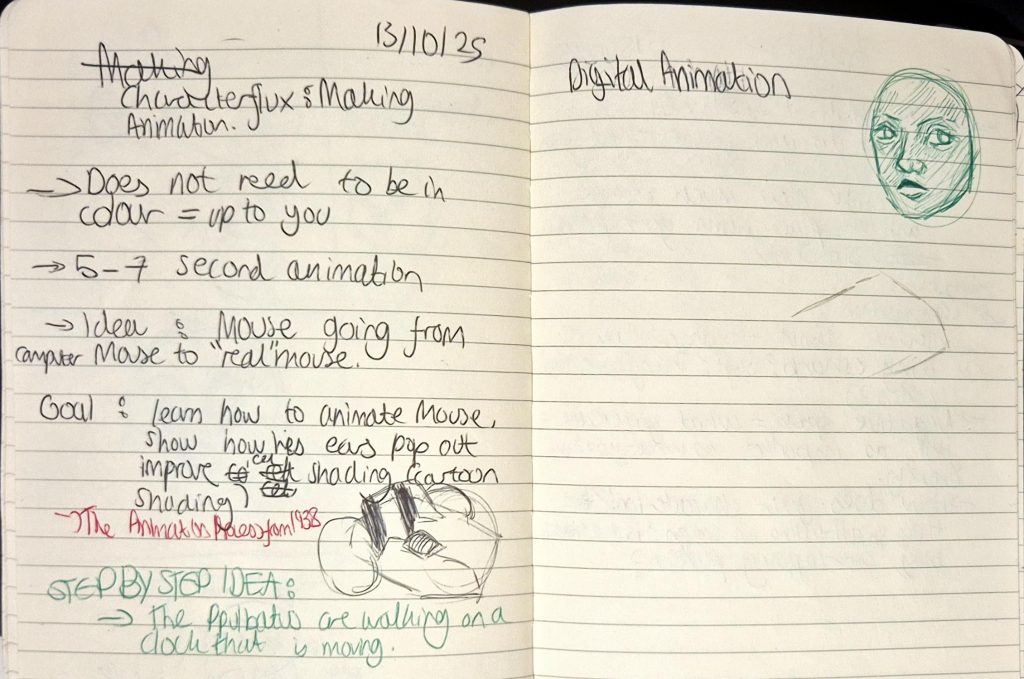
    My notes

  • BREAKING CHARACTER — 10/10/25


    Today was finally presentation and feedback day! We ended up sharing our work onto Padlet and gave each other feedback from there, which was honestly a relief because I’m always so nervous when public speaking! However, at some point my brain did become saturated enough to the point that I couldn’t really think of anything else to comment, and I felt bad about it because everyone did so well and l wanted to give their work my full attention.

    The feedback I got was overwhelmingly positive, and I was able to learn a lot from how everyone viewed my work and what they wanted to see more of. Feedback that I received included (paraphrasing):

    • Notes for design are extremely detailed, a lot of thought was put into character design and storytelling.
    • Mouse is very expressive.
    • Experiment with different colours to see how it could fit within the setting.
    • Seems like a very comedic character due to his appearance and qualities.
    • Consider how he moves and interacts with the environment -> since his tail is a big part of his character, find more ways to have him use it to interact with the environment without being unplugged.
    • Consider his personal development: how his inferiority complex evolved, whether he goes on a journey to recognise his self-worth, etc.
    • Consider: Since Wireless Mouse was mentioned, what would he look like in contrast with Mouse? Could Mouse get crumbs in between his parts when eating human food? How does Mouse transform when humans aren’t around? Would Mouse’s tail be visible from a front perspective?
    • Changing the eyes to square works well.
    • Change the background to white to make sketches stand out.
    • The ‘disgusted’ facial expression appears more ‘annoyed’ + pleading doesn’t communicate as well as the other expressions.
    • Find more non-human animation references as examples?

    Overall, I think I definitely achieved the goal that I wrote at the beginning of the rotation, and created a character that was simple and stylistic, and that I was confident in sketching out quickly instead of taking my time to draw. However, I really wanted to also do a motion plan/character design for the Wireless Mouse, but I felt it would be better to prioritise Mouse (Wired Mouse) for this rotation and I could then explore the Wireless Mouse’s design in my free time. I’m excited to use the lessons I learned in this rotation and apply it to Making Character, where I’ll actually be animating Mouse properly for the first time!

    New version of final outcome with some of the feedback in mind.


  • BREAKING CHARACTER — 08/10/25


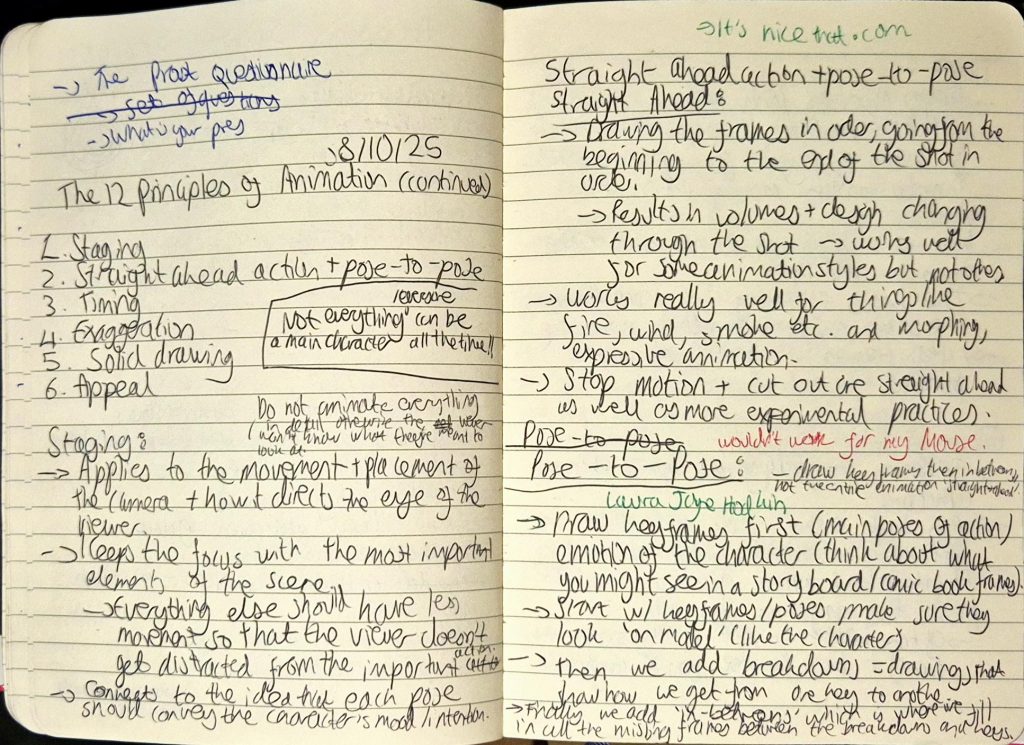
    We learned the last 6 principles of animation, which were:

    1. Staging: Applies to the placement and movement of the camera and how it engages the viewer, keeping the focus on key elements of a scene.
      • E.g. if showing a cafeteria, focus the main characters eating rather than the background characters moving around.
    2. Straight ahead/pose-to-pose:
      • Straight ahead: used in more experimental practices. Is the process of drawing each frame in order, which results in the volume of the object/character changing.
        • E.g. animating fire.
      • Pose-to-pose: used in character animation. Is the process of drawing the keyframes (main poses of action) first and making sure they look exactly like the character, before moving onto breakdowns and then in-betweens.
        • E.g. animating a human character.
    3. Timing: Helps objects look more realistic/stylised depending on what the intentions are with the animation. Linked with ease in/ease out to an extent, as it describes how more frames = slower/softer timing, less frames = faster/more abrupt timing.
    4. Exaggeration: Enhances storytelling and is used to express extreme emotions. Less exaggeration = more realism, more exaggeration = more stylised.
    5. Solid drawing: The idea that characters need to be drawn in 2D but appear as though they exist within a 3D space.
      • This involves using design techniques such as line, form, anatomy, volume, weight, light etc.
    6. Appeal: A character must be made to look compelling enough to draw the audience into the story.
      • This can be achieved through design (colour, shape, language etc.).

    My notes

    The activities we did to explain staging and exaggeration were really fun to participate in.

    For staging, Jess told us to get into large groups of 2 and create a tableau that we’d show to the other group and vice versa. These tableaus would allow us to see how we can use secondary actions to support the main action without being too distracting. Our group came up with a fight scene, with Berni and I fighting and everyone else watching and filming.

    For exaggeration, we had to individually come up with the loudest and most exaggerated yawn, and also the most subtle yawn that still looks like said action.

    Since the overall assignment (including the motion plan) involves creating a triptych from the original character experimentations that we did last week (alongside the character sheet, expression sheet and character turnarounds) I also asked Jess whether we could include additional information about our character’s personality and the original character designs I made alongside some physical characteristics, and she said we could. Therefore, on Thursday I finished my motion plan of Mouse, which is shown below:

    I didn’t end up writing notes for each principle because it was so difficult to think about how each one would be used in Mouse’s design and movements, and so I merely discussed 9 out of 12 of them, with visual evidence for squash and stretch and exaggeration.